Apple Memoji Prompt
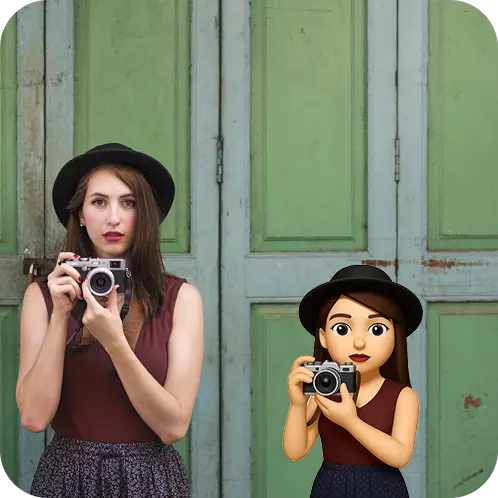
Each apple-memoji-prompt is a locked prompt recipe that produces clean, iOS-style 3D Memoji stickers with smooth shading, friendly eyes, crisp edges, and simple backgrounds. Browse the gallery, tap any video to preview the style, and generate your own Memoji-style sticker from a photo in seconds. No prompt writing or guesswork—every preset is tuned for consistent results.
How it Works
Browse & Tap a Video
Each video shows a real Memoji-style result. Tap the one you like to open Image-to-Sticker with the matching apple-memoji-prompt preset already applied.
Upload Your Photo
Use a clear, front-facing photo with good lighting. The AI keeps your facial features while applying the Memoji style automatically.
Generate & Download
Generate in one click, then download a high-resolution PNG ready for profile pictures, chat stickers, or social media.
Best results: Use a front-facing photo with even lighting and a simple background.
Frequently Asked Questions
What is an apple-memoji-prompt?
An apple-memoji-prompt is a prompt recipe that guides the AI to generate Memoji-style 3D stickers with a clean iOS look, smooth shading, and crisp edges. This page shows real previews and the prompt structure behind each preset.
How do I use an apple-memoji-prompt preset?
Pick a preset from the gallery, upload a photo in Image-to-Sticker, then generate and download. The prompt is already applied, so no writing is needed.
Which apple-memoji-prompt preset looks most like Apple Memoji?
Classic iOS Memoji gives the cleanest Apple-like result. For a sticker that resembles your actual face more closely, try the Photo-Accurate preset.
Can I customize the apple-memoji-prompt?
Presets are locked to keep results consistent with the previews. The prompt formulas are shown for transparency so you can understand how each style works.
Ready to create with RoboNeo AI?
Create a RoboNeo AI account, pick a credit pack or subscription, and start generating stickers, product shots, backgrounds, and more.