Higgsfield Genjutsu AI: How It Works, Is It Free, and a Free Alternative
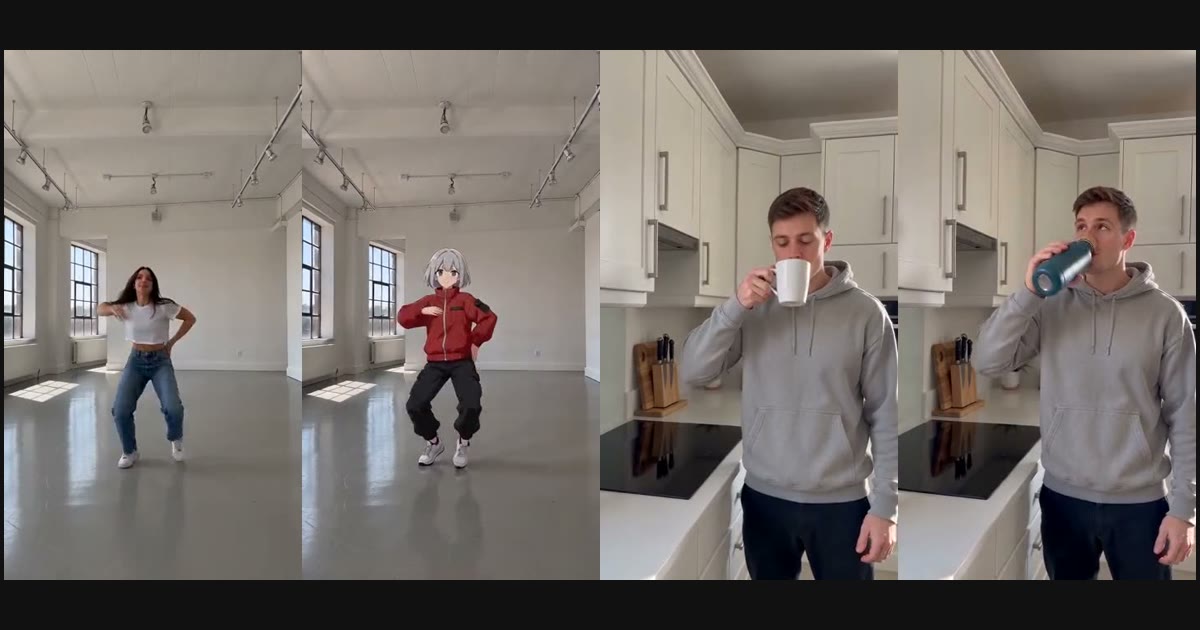
What is Genjutsu AI? How Higgsfield Genjutsu's Motion Transfer and Object Swap work, which model powers it, what it costs, and how to try a Genjutsu AI generator free.
Genjutsu AI is a video-to-video technique that rebuilds part of an existing clip, such as the person on screen or the object in their hands, while keeping the original motion, timing and camera work. The name comes from Higgsfield Genjutsu, a tool Higgsfield launched at the end of August 2026. You don't generate a new video from a prompt; you take footage you already have and swap one element.
TL;DR (as of October 2026)
- Higgsfield Genjutsu has two core features: Motion Transfer (new character, same movement) and Object Swap (new object, same shot). Its API also lists a Restyle workflow.
- Higgsfield Genjutsu runs on paid credits; there is no advertised free Genjutsu video.
- RoboNeo's Genjutsu AI generator does Motion Transfer and Object Swap with ByteDance Seedance 2.0 models, and your first video is free with your first purchase.
- RoboNeo is not affiliated with Higgsfield.
Want to try it now? Open the free Genjutsu AI tool, upload a 2–15 second clip, add a photo or pick a preset character, and press Generate.
What is Higgsfield Genjutsu?
Higgsfield Genjutsu is a video editing tool that changes a chosen part of a clip, such as a character, outfit, object or location, without reshooting. Everything you don't target stays as filmed. It works on real footage and on AI-generated video, and a preset can drive the whole change without a written prompt.
According to Higgsfield's launch post, the key settings are:
| Setting | Higgsfield Genjutsu |
|---|---|
| Video input | 1 clip, 4–30 seconds |
| Reference images | Up to 30 per generation |
| Prompt | Optional (short description or preset) |
| Presets | 30+ |
| Output | Up to 1080p |
The Genjutsu API documentation lists three workflows: Motion Transfer, Object Swap and Restyle.
How does Genjutsu AI work?
Genjutsu AI separates what happens in a clip (motion, timing, camera) from what appears in it (people, objects, style), then re-renders the clip with new appearance and the old motion. You supply the source video plus a reference image of the new character or object; the model generates a new clip that follows the source frame by frame.
In practice there are two modes worth knowing.
Motion Transfer vs Object Swap
| Motion Transfer | Object Swap | |
|---|---|---|
| What changes | Who is on screen | One featured object |
| What stays | Motion, timing, camera, background | Person, motion, scene, lighting |
| You upload | Source clip + character image | Source clip + object image |
| Typical use | Dance trends with an original character, AI influencers, live action → anime | Product ad variations, localized ads, packaging tests |
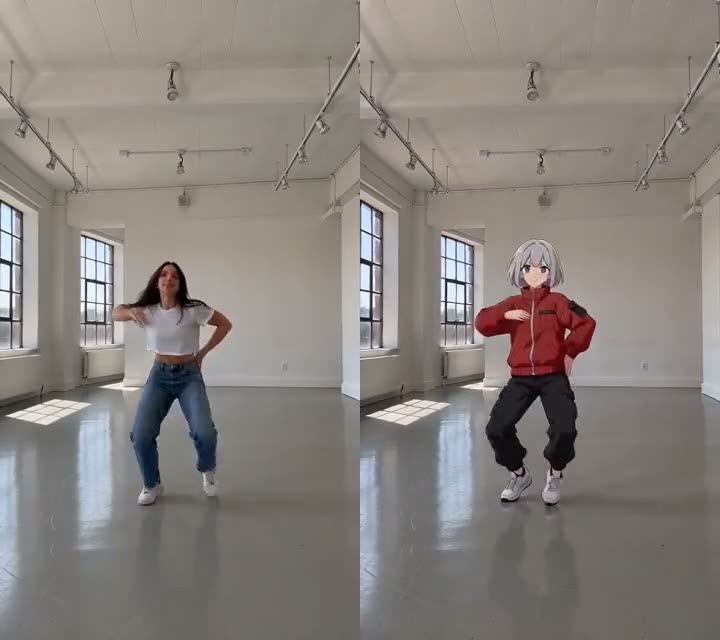
Here is Motion Transfer on RoboNeo: the same dance, performed by an anime character.
And Object Swap: the man, kitchen and movement stay; only the mug becomes a teal water bottle.
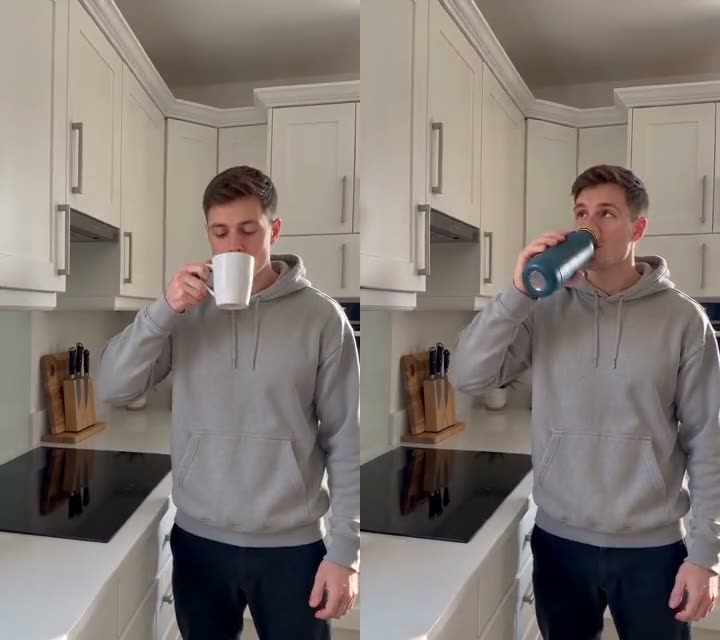
Both examples were generated on RoboNeo with Seedance 2.0 Mini at 480p from 5-second source clips. You can watch them, plus three more, on the Genjutsu AI page.
Is Genjutsu AI free?
Genjutsu AI is not unlimited-free anywhere we checked, but you can make your first Genjutsu video free on RoboNeo: buy any pack or plan, and your first Seedance 2.0 Mini, 480p, 5-second video costs 0 credits. After that, a 5-second 480p clip from a 5-second source costs 80 credits on RoboNeo, and the exact price is shown on the Generate button before anything is charged.
A few details:
- The free video uses the cheapest setting (Seedance 2.0 Mini, 480p, 5 seconds). If you switch to a higher setting, it is billed normally.
- The source clip's seconds are billed together with the output. A 10-second source with a 5-second output costs more than a 5-second source.
- Failed generations are refunded automatically.
- The cheapest one-time option is the Video Pack ($6.99, 500 credits).
Can I use Higgsfield Genjutsu for free?
Higgsfield Genjutsu runs on paid credits, so there is no advertised way to make a Genjutsu video for free there. If you want to try Genjutsu-style Motion Transfer or Object Swap first, RoboNeo makes your first Genjutsu AI video free with any first purchase.
Why that matters if you are just testing the idea:
- The video itself costs 0 credits. Any pack counts, including the one-time Video Pack, so you don't need a subscription.
- No photo needed to start. Pick the Anime, 3D Cartoon or Toy Figure preset; the prompt is already written.
- No risk on failed runs. If a generation fails, the credits come back automatically.
- Same core result. New character or new product, with the original motion, timing and camera.
Make your first Genjutsu AI video free →
Which AI model does Genjutsu use?
Higgsfield runs Genjutsu as its own workflow and does not name an underlying model in its launch post. RoboNeo's Genjutsu AI uses ByteDance Seedance models that accept a reference video: Seedance 2.0 Mini, Seedance 2.0 Fast and Seedance 2.5.
| Genjutsu AI model on RoboNeo | Resolution | Best for |
|---|---|---|
| Seedance 2.0 Mini | 480p, 720p | Lowest cost; the free first video |
| Seedance 2.0 Fast | 480p, 720p | Sharper detail, steadier faces |
| Seedance 2.5 | Up to 1080p | Final deliverables |
The reference-video input is what makes this possible: the model reads the source clip as a motion and layout guide and the image as an appearance guide.
What is the best Genjutsu AI generator?
For most creators trying Genjutsu AI on short social clips, RoboNeo is the easier pick: your first video is free, you choose the model that fits your budget, and you can start with a preset character instead of a photo.
| RoboNeo Genjutsu AI | Higgsfield Genjutsu | |
|---|---|---|
| Your first video | Free with your first purchase | Paid credits |
| AI model | Your choice: Seedance 2.0 Mini, Fast or 2.5 | One built-in workflow |
What you get on RoboNeo:
- Free first video at Seedance 2.0 Mini, 480p, 5 seconds, a normal MP4 with no watermark.
- Model choice: start cheap with Mini, move to Fast or Seedance 2.5 (up to 1080p) only for the clips you post.
- Three aspect ratios: 9:16 for TikTok and Reels, 16:9 for YouTube, 1:1 for feeds.
- Pay as you go: buy credits once, use them on Genjutsu AI, Hotel Lobby AI or any other RoboNeo video tool.
How to use a Genjutsu AI tool, step by step
- Pick a mode. On the Genjutsu AI generator, choose Motion Transfer to change who is on screen, or Object Swap to change what they hold.
- Upload the source clip. MP4 or MOV, 2–15 seconds, up to 10 MB. One clear subject and steady framing work best.
- Add the new character or object. Upload one photo, or in Motion Transfer pick the Anime, 3D Cartoon or Toy Figure preset.
- Choose settings and generate. Seedance 2.0 Mini at 480p and 5 seconds is the cheapest (and the free first video). Choose an aspect ratio of 9:16, 16:9 or 1:1, press Generate and download the MP4 after 2–5 minutes.
Can Genjutsu AI change the style of a video?
Yes, but in our tests the reliable way is a styled character image, not a text prompt. On 2026-10-04 we ran Seedance 2.0 Mini restyles with text alone ("make this claymation") and with generic style images; most outputs came back nearly identical to the source. When the reference image was a character already drawn in the target style (anime, 3D cartoon, toy figure), the output changed style while keeping the dance. That is why RoboNeo offers style changes as Motion Transfer presets. Higgsfield lists a dedicated Restyle workflow; we haven't benchmarked it.
Tips for a clean Genjutsu AI result
- One subject, fully in frame. Crowds, fast cuts and subjects leaving the frame confuse the motion guide.
- Match the length. Choose an output length close to the source so motion isn't compressed.
- Use a front-facing, full-body character image on a plain background for Motion Transfer.
- Object Swap works best on a clearly visible handheld object. A bottle, cup, bag or shoe in the center of the shot swaps more cleanly than a tiny prop.
- Only use footage and faces you have rights to. Models may reject celebrities, brands and protected characters, and platforms ask you to label AI-generated content.
FAQ
What does "genjutsu" mean?
Genjutsu is the illusion technique from the anime Naruto. Higgsfield borrowed the name for a tool that makes footage show something that was never filmed.
Is RoboNeo Genjutsu AI the same as Higgsfield Genjutsu?
No. It is an independent Genjutsu AI tool built on Seedance models. It offers the same two core ideas, Motion Transfer and Object Swap, with different limits and pricing.
How long can my source video be?
On RoboNeo, 2–15 seconds (MP4 or MOV, up to 10 MB). On Higgsfield, 4–30 seconds.
Does Genjutsu AI need a prompt?
No. Both tools work from a reference image or preset. RoboNeo prefills a short prompt for each mode, which you can edit under Advanced.
Can I use my own character or product?
Yes. Upload one photo of the character (Motion Transfer) or the product (Object Swap).
Is the free Genjutsu AI video watermarked?
No. The free first video on RoboNeo is a normal MP4 download.
Try Genjutsu AI
Upload a clip, pick a character, and see your footage recast in a few minutes. Make your first Genjutsu AI video free.
Higgsfield and Genjutsu are trademarks of their respective owners. RoboNeo is not affiliated with, endorsed by or sponsored by Higgsfield. Higgsfield details in this article come from its public launch post and documentation as of October 2026.